Playing along
cecilia can play a score together with the real recording, so you can practise against the band rather than a MIDI rendering. You sync the recording to the score once, then loop, slow down and transpose it as you practise.
1. Attach a recording
Open the score, then attach an mp3, m4a/aac, flac, ogg or wav file:
With no file name, cecilia picks the best match next to the score or in an mp3/ or audio/
folder beside it. Guitar Pro 7 and 8 files that carry their own recording use it straight away.
2. Sync it to the score
The recording has to know where each bar starts. Press S to enter Sync mode (or run
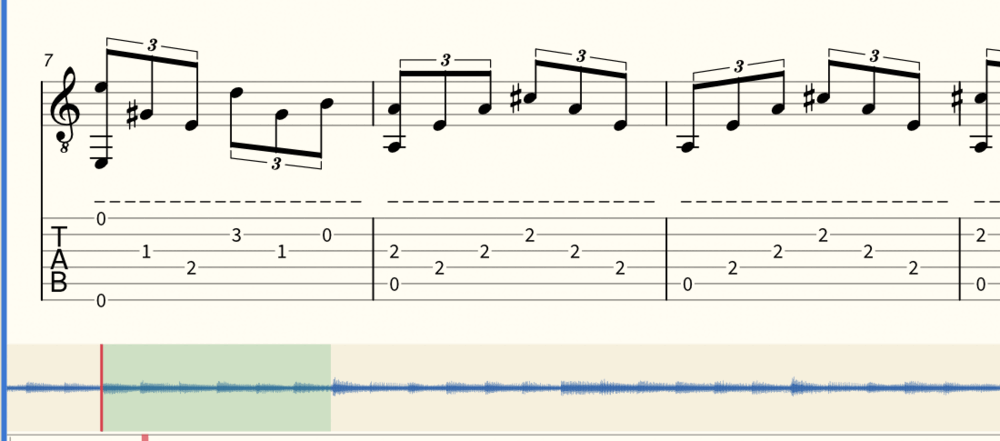
:sync). The waveform opens under the score with the sync points marked.
- Tap it in: press
Spaceto play, andEnteron each beat as you hear it. The cursor moves on after each tap.utakes the last tap back. - Let cecilia find the beats: tap the first downbeat, then run
:sync-detect. It fills in the rest by beat detection, which you can correct by hand. - Fine-tune:
[]move the sync point under the cursor by 10 ms,{}by 50 ms.
Press Esc to leave Sync mode. Sync points are saved with the score (.ccc / .ccm files keep
them per beat; Guitar Pro files keep one per bar).
3. Practise
| keys / command | what it does |
|---|---|
Space Space |
play / pause |
Space l |
loop the selected bars (or the cursor's bar); again to stop |
:loop 9 16 |
loop bars 9 to 16 |
Space - / Space = |
speed down / up by 5%, without changing the pitch |
:trainer 60 100 5 |
start at 60% and get 5% faster each loop, up to 100% |
:pitch -2 |
shift the recording down two semitones, keeping the tempo |
Space a |
play the recording and the MIDI, the recording only, or the MIDI only |
Space m, Space c |
metronome, count-in |
:volume audio 80 |
set the level of the recording (also midi, metronome, master) |
The tracks panel (Space T) has a row for the recording, with its own volume, mute and
solo, so you can drop out the MIDI guitar and play that part yourself.
Chant recordings
Chant is synced syllable by syllable rather than by beats. :sync-detect on a chant follows the
pitches sung in the recording. See Chant.
Rendering to audio
To export the score mixed with its recording: